Tutorial #06 of 13
8 min
Safe Execution & Planning
Review Diffs and Execute Safely
TUTORIAL GOAL
Review staged changes, understand undo/retry controls, and execute operations with confidence.
Click to view fullscreen
→ Why This Matters
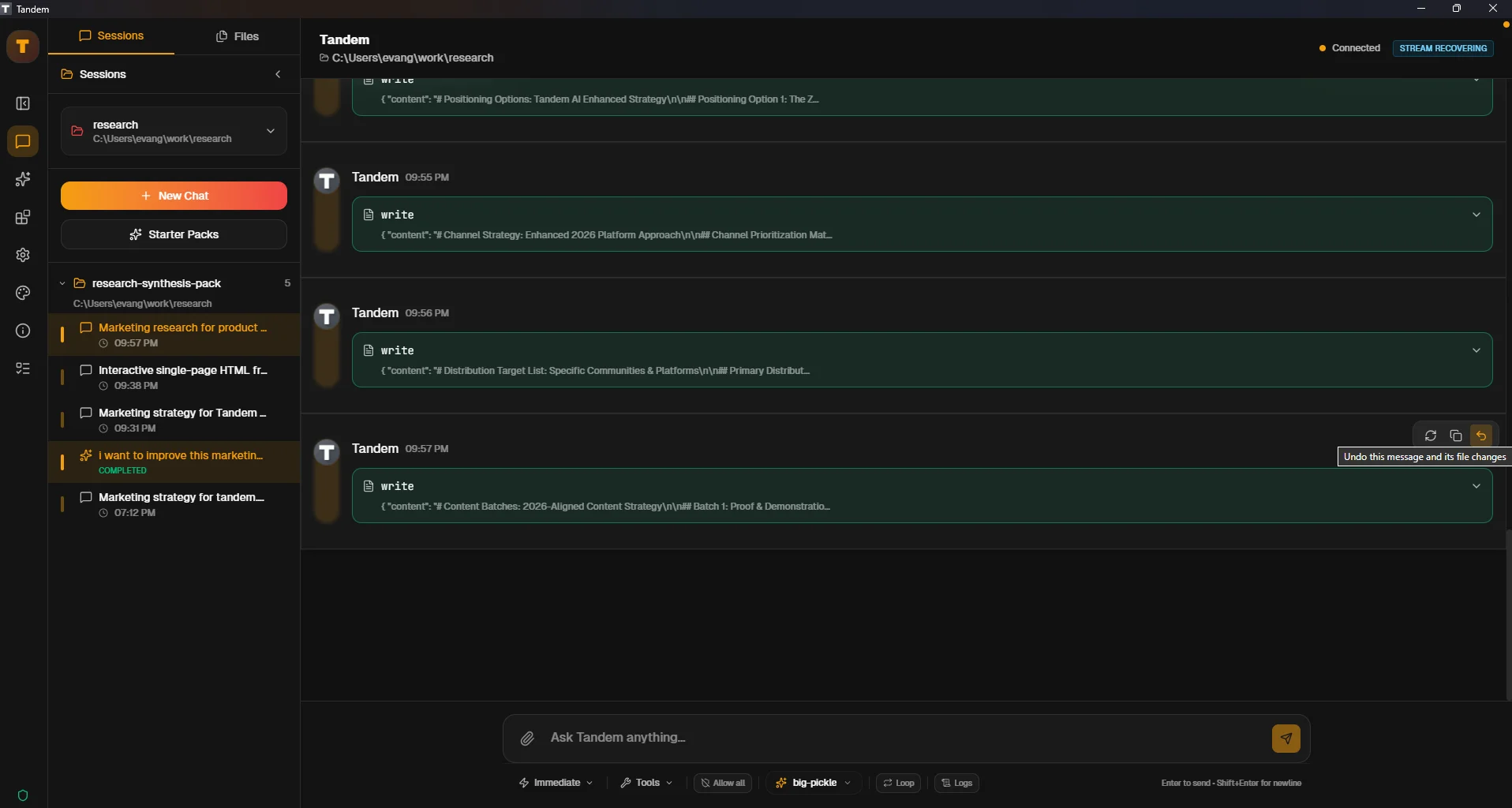
Before executing, you should review exactly what will change. Tandem provides undo, retry, and copy controls to help you manage changes safely.
→ What You Will Do
- Review operation details and changes
- Use undo, retry, and copy controls
- Execute staged operations after review
→ Step-by-Step Guide
1
Ensure you have staged operations in Plan mode (from previous tutorial)
2
Click on a staged operation to view details
3
Review the proposed changes carefully
4
Use controls: Undo (revert), Retry (try again), or Copy (copy code)
5
When satisfied, approve and execute the batch
✓ Verification Checklist
- You can view detailed changes for staged operations
- You understand what undo, retry, and copy do
- You successfully executed a reviewed batch of changes
⚠ Common Mistakes
- •Executing without reviewing the changes
- •Not knowing how to undo if something goes wrong
- •Approving operations with unclear or unexpected changes